How to Securely Implement Login in Django: Best Practices and Protection
How to securely implement login in Django is essential for protecting your web application from common security threats such as brute-force attacks, CSRF, and session hijacking. By using Django’s built-in authentication framework, you can safely store passwords with strong hashing and easily manage user authentication. Implementing Role-Based Access Control (RBAC) ensures that sensitive views are restricted to specific user roles like Admin, Manager, or Employee, providing better control over access.
This guide on how to securely implement login in Django also emphasizes adding Two-Factor Authentication (2FA) for extra protection, requiring users to verify their identity with OTPs via email or SMS. Additionally, using django-axes prevents brute-force login attempts by blocking repeated failures. Enforcing HTTPS, secure cookies, and CSRF protection further enhances security, giving you a strong and reliable login system that keeps user accounts and data safe.
A secure login system is the backbone of every web application. In this case study, I explain how to build a secure Django login system with industry best practices.
This guide highlights:
- Why Django authentication is reliable
- How to protect against common threats like brute-force attacks and CSRF
- The complete workflow of a secure login system
The Challenge of Securely Implementing Login in Django
Most businesses face the same issue:
- Default login systems are vulnerable to attacks if not configured properly.
- Poor password handling → data leaks.
- No 2FA or brute-force protection → easy exploitation.
- Weak sessions → hijacking risks
My Solution (Step by Step) to Securely Implement Login in Django
1. Django Authentication Framework
- Used Django’s built-in User model and authenticate() function.
- Passwords stored with PBKDF2 hashing + salt.
2. Role-Based Access Control (RBAC)
- Created different access levels → Admin, Manager, Employee.
- Restricted critical views using decorators (@login_required, @permission_required).
3. Two-Factor Authentication (2FA)
- Implemented OTP-based 2FA (via email or SMS).
- Ensures stolen credentials alone cannot compromise accounts.
4. Brute-Force Protection
- Used django-axes to block repeated failed login attempts.
5. Secure Session & CSRF Protection
- Enabled SESSION_COOKIE_SECURE and CSRF_COOKIE_SECURE.
- Used HTTPS-only cookies.
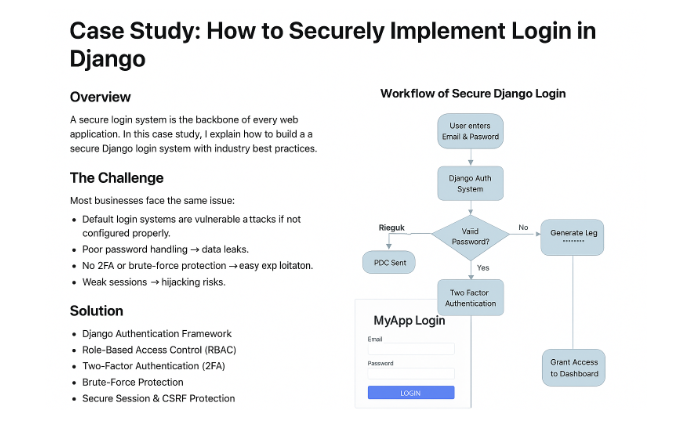
Workflow of Secure Django Login
flowchart TD
A[User enters Email & Password] –> B[Django Auth System]
B –>|Check Hash| C{Valid Password?}
C –>|No| D[Block attempt & Log failure]
C –>|Yes| E[Two-Factor Authentication]
E –>|OTP Sent| F[User Enters OTP]
F –>|Valid| G[Generate Secure Session Token]
G –> H[Grant Access to Dashboard]
How to Securely Implement Login in Django
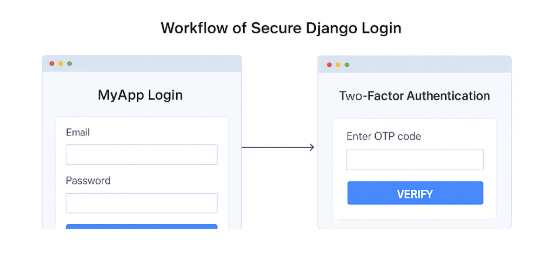
Login Page Example (Django + Bootstrap)
- Fields: Email, Password
- “Forgot Password?” link
- Login button
Two-Factor Authentication Page
- Field: Enter OTP code
- Resend OTP option
Admin View (Django Admin)
- Shows user roles and permissions.
Results (Why Clients Care)
✔️ Strong password hashing → no plain-text storage
✔️ 2FA → protected accounts, even if credentials leak
✔️ Brute-force protection → blocked malicious logins
✔️ CSRF + HTTPS → safe against session hijacking
✔️ Role-based permissions → fine-grained access
Tech Stack
- Backend: Django, Django REST Framework
- Security: Django-AllAuth, Django-Axes, PyOTP
- Frontend: React (Login/OTP UI)
- Database: PostgreSQL
- Infra: AWS EC2, RDS, CloudWatch
Code Snippet (Login Flow)
from django.contrib.auth import authenticate, login
from django.http import JsonResponse
from axes.decorators import axes_dispatch
@axes_dispatch

def secure_login(request):

    username = request.POST.get('username')

    password = request.POST.get('password')

    user = authenticate(request, username=username, password=password)

    if user:

        login(request, user)

        return JsonResponse({"message": "Login successful, OTP sent"})

    return JsonResponse({"error": "Invalid credentials"}, status=401)
Securely Implement Login in Django
Need Help? Contact us for Securely Implement Login in Django:
+91 98826 06526
Web.Expert1380
+91 94594 16526
FaceBook
WebExpert1380@gmail.com
Check Our Whole Services